Private family calling

The home phone,
reborn.

A phone for your kids, your parents, and the people you actually trust. Tap a face in the app, or pick up a real house phone. You decide who can call.

Free on the App Store. Hosting is 30 days free, then $25/year. Mac, Windows, Linux, Home Assistant, Docker.

  • FreeiPhone app
  • $25a year to host
  • $0for everyone who joins your mothership

How you call

Tap a face.

Kids don’t get a contact list of the whole world. They get the people you put on the phone. One tap rings Mom, Grandma, Dad — nobody else.

  • 01
    Only your peopleParents approve every face before it can be called.
  • 02
    Made for a childBig photos, a talk-time cap, Quiet Time that still lets VIPs through.
  • 03
    A real iPhone appLock-screen Answer and Face ID. Android and computers use the browser.
  • 04
    No feed hiding under the phoneNo strangers, no ads, no algorithm. It is a phone.

Or pick up

The phone already in the house.

Any regular phone — corded, cordless, the beige one from a thrift store — plugs into a small adapter. Same family. Same rules. No phone company.

  • 01
    If it has a phone cord, it fitsCool old handsets are the point, not a gadget you have to buy from us.
  • 02
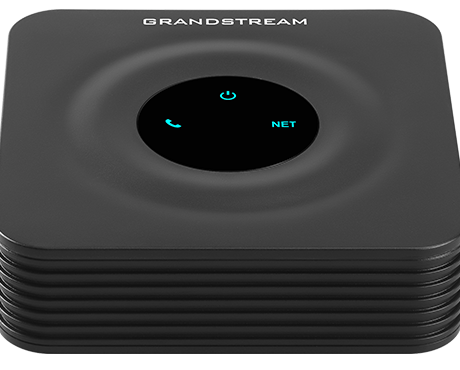
    Grandstream HT801, about $40Deck-of-cards size. Ethernet to your router, phone in the jack.
  • 03
    Encrypted, like the appSIP TLS and SRTP. It only rings people in that child’s circle.
  • 04
    Not a 911 phoneKeep a real cell or landline for emergencies. This line stays in the family.

A parent sets the house phone up from the app. No installer visit. See the phones that fit.

A boy on a sofa talking on a green corded house phone
The phone kids actually pick up.
A beige push-button house phone with a coiled cord
Grandstream HT801 analog telephone adapter
The adapter

Hamburger. Banana. The one with the giant bells.

A phone cord is the only requirement. The adapter does not care what it looks like.

Oak Western Electric 317 wall phone: two bells on the front, a butterstamp receiver, a mouthpiece, and a side crank. No dial.
Wall phoneThe giant bells
Plastic cheeseburger phone, the sesame bun hinged open over a numbered keypad
HamburgerSesame seeds included
Yellow banana phone with a green stem and green cord, resting on a low green stand
BananaThe yellow one
Rose pink Western Electric Princess phone: low oval base, dial in the top, handset behind the dial
PrincessDial in the base
Glossy red Hot Lips phone, closed, the upper lip seated on the lower lip
LipsGloss red
Small football phone standing on a low kicking tee, white laces down the front
FootballLaces included

Kids, grandparents, and the app.

The house phone is for whoever still wants to pick it up. Everyone else taps a face.

A girl talking on a beige wall phone with the rotary dial on the box
554Dial on the box
A boy holding a red one-piece Ericofon on a porch
EricofonOne piece
A girl on a bed talking on a white Trimline, the dial in the handset
TrimlineDial in the handset
A boy talking on a red model 302 desk phone in a playroom
302Red bakelite
A grandmother talking on a black model 500 rotary phone
500Black rotary
A grandfather talking on a candlestick phone in a mudroom
CandlestickOn the bench
A woman looking at the PhoneHome parent screen on a smartphone
ParentThe app
A man sitting on a porch looking at the PhoneHome speed dial
Speed dialTap a face

Parent tools

Private calls. You’re in control.

Calls are encrypted. We help you set the phone up. We don’t listen, and we don’t keep what was said. Quiet Time, a PIN, and a pause button stay yours.

  • 01
    Quiet TimeBedtime and school hours per kid. The people you mark VIP can still get through.
  • 02
    TimeoutOne switch stops calls for the whole household. Turn it off when you’re ready.
  • 03
    Your PIN, their phoneLock a device into the kid’s phone so Parent controls stay behind the PIN.
  • 04
    The record stays homeAccounts, contacts, and call history live on the Mothership you run. No recording. No ads. No location.

Apps use WebRTC with DTLS-SRTP. The push relay only tells Apple an iPhone should ring — it stores none of it. Privacy policy.

How it nests

One Mothership. Every family you invite.

The Mothership is a small server you — or someone you trust — leave running. It hosts the families. You don’t rent a phone line, and joining families never see each other’s phone books.

  1. MothershipThe computer that stays on. Mac, PC, Pi, Home Assistant, or Docker.
  2. PodA family name. North. East. West. Parents run that Pod.
  3. CircleOne child, and only the people their guardians allow them to call.
  • 01
    Invite a sister or in-lawThey join your Pod as a parent and add their own kids. Never invite a child alone.
  • 02
    Invite Grandma and GrandpaA simpler phone: big buttons, one tap, the grandchildren you chose.
  • 03
    Invite one kid’s friendThat friend’s parent lands in one child’s Circle — not your whole family phone book.
  • 04
    Up to 50 phonesApps and house phones, as many families as you like, on the one license.

Source is published on GitHub for security review. It is proprietary — you may inspect it, not copy, fork, or redistribute it. The host license pays for installers, updates, and the push relay.

The host license

$25 / year

One person hosts. Everybody else just picks up.

  • 30 days free from first boot. No card. Nothing renews on its own.
  • Then $25 a year, up to 50 phones, any number of families.
  • Kids, grandparents, and friends who join pay $0.
  • Walk away and your family’s data stays on your machine.
Joining a family

Get the app.

Someone you trust already runs a Mothership. Install the free iPhone app, or open their invite in the browser. You don’t pay, and you don’t install a server.

Get the iPhone app →
You’re the host

Start a Mothership.

Put it on a computer that stays on. Invite your kids, your parents, your sister. Every feature is on for 30 days. Keep it for $25 a year.

Download the free trial →

Straight answers

Who pays?

Only the person who hosts the Mothership. It’s free for 30 days from first boot, then $25 a year for up to 50 phones. Kids, grandparents, and other families who join pay nothing.

What do I actually install?

Joining: the free iPhone app, or a browser, plus the invite your family sent. Hosting: the Mothership on a Mac, Windows PC, Linux machine, Raspberry Pi, Home Assistant, or Docker. The trial clock starts when you first boot it, not when you download it. All the downloads.

Do kids need a special phone?

No. The app is enough. A house phone is optional: any regular RJ11 phone into a Grandstream HT801, about $40. Corded, cordless, and thrift-store sets all work. It is not a substitute for 911.

Where do calls and contacts live?

On your Mothership. PhoneHome sells the license and runs a push relay so iPhones can ring. It does not keep call audio, contacts, or call history. No recording, no ads, no location tracking. The full policy.

Can it call regular numbers?

No. This is a private family network, not a carrier. It does not call the public phone network or 911. Keep a real cell or landline for emergencies.

Already have an invite?

You don’t need this trial. Open the link they sent, or get the iPhone app and paste their Mothership address.

PhoneHome

The home phone, reborn.

Bring your people back to a phone that only rings for them.